2020.06.14 nahamconCTF

Nahamcon 2020 Crypto - Docxor

Nahamcon 2020 Crypto - Docxor writeup: cryptography, magic, known_plaintext

Event
nahamconCTF
Category
crypto
Topic
Crypto
Published

Docxor

Docxor challenge: decrypt the homework file using a four-character password; 75 points and 189 solves.

Getting hints from the name, one could tell, it is XOR and its about a doc.
Still, first thing to consider is running the file command to see whats the homework file is about

Plain text2 lines / static highlight
file homework
homework: data

Cool! this means, the homework file is simply XOR encryption of a .doc file with 4 byte key. But hey that should ring bells since the first few bytes are file signature also called magic bytes sometimes.
Using the magic bytes, we can recover the xor key and hence the full document after xoring with the xor key.
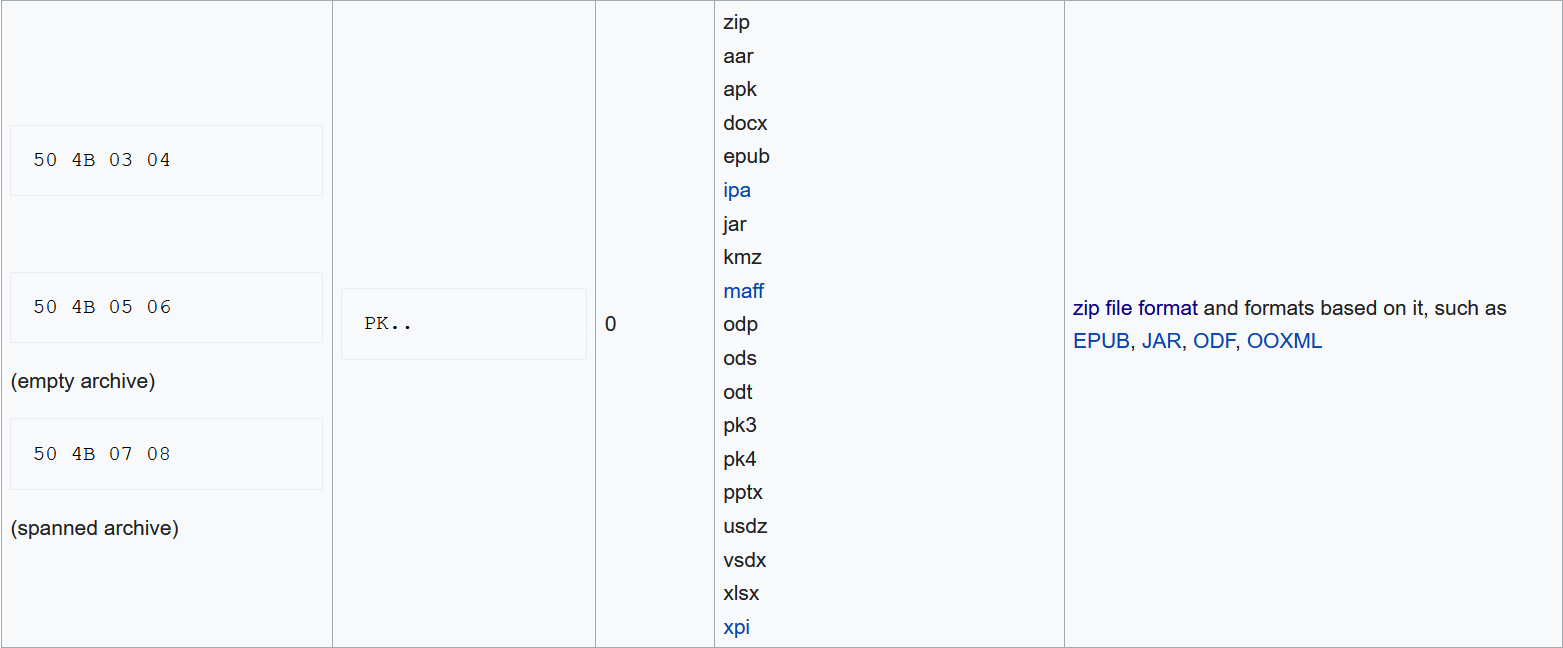
File-signature table showing 50 4B 03 04 for ZIP-based formats, including DOCX.

The magic bytes we seek are 50 4B 03 04. The first four bytes of the homework are 0a0a 9abf, the xor key should be 0a0a9abf ^ 504b0304 = 5a4199bb Lets write a quick script.

Python11 lines / static highlight
from pwn import xor

with open('homework', 'rb') as homework_file:
    homework_data = homework_file.read()

HEADER = homework_data[0:4]
MAGIC = b"\x50\x4B\x03\x04"
XOR_KEY = xor(HEADER, MAGIC)

with open('decrypted.doc', 'wb') as decrypted:
    decrypted.write(xor(XOR_KEY, homework_data))

This produces decrypted.doc which when opened looks like Decrypted document text matching the flag transcribed below.

flag{xor_is_not_for_security}